
In this section (22)
- Profections
- Zodiacal releasing
- Firdaria
- Decennials
- Circumambulation
- Primary directions
- Speculum
- Ascensional times
- Progressions
- Planetary hours
- Lunations
- Aspects
- Declination
- Midpoints
- Dignities and triplicity lords
- Lots
- Fixed stars
- Minor planets
- Chart family
- Elements and Quadruplicity
- Temperament
- Moon
Decennials
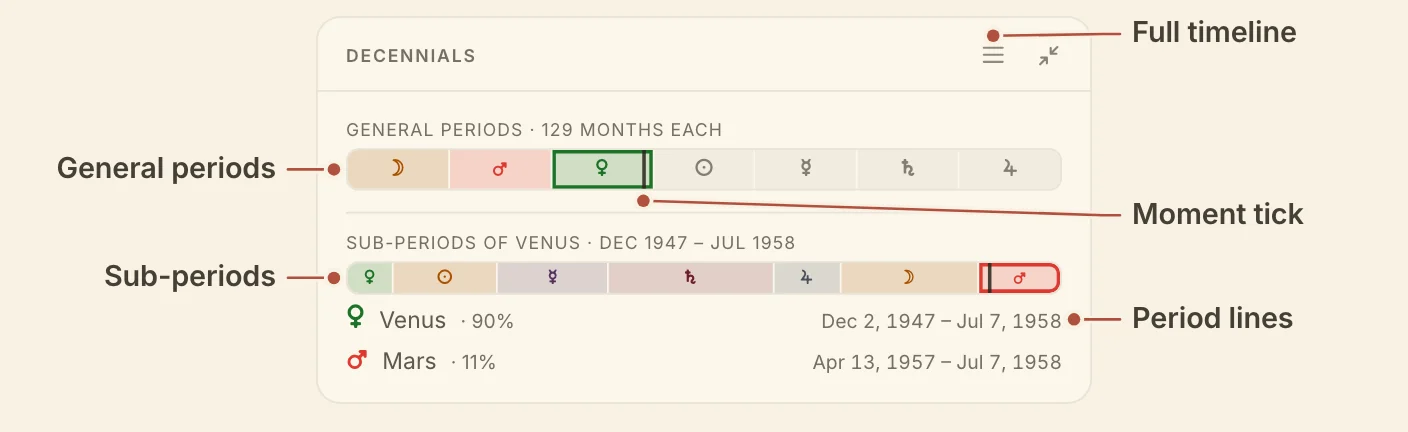
The Decennials card shows the general period and sub-period in force at the chart's moment, on two bars, so you can read the periods of any year without moving the chart.
Reading decennials
The Decennials card reads the chart's periods off two bars, and you can step to any period without moving the chart's moment. The upper bar, General periods · 129 months each, has a segment for each general period. The lower bar, Sub-periods, splits the general period you are reading into its sub-periods, each as wide as it is long. Periods still to come are dimmed, and a tick marks the chart's moment.
Under the bars, one line names the general period and one the sub-period, each with its dates. On the period in force the line shows how far through it you are. Hover its segment for the time left.
Hover any segment for its planet, dates and ages. Click a segment to read that period, and the chart's moment stays where it is. The back to now button returns to the periods in force.
The list button in the card's header, Full timeline, turns the card over to Decennials · timeline. It lists every general period with its dates, with "now" beside the one in force. Click a general period to open its sub-periods.
Minimized, the card shows General and Sub-period, each with its bar. Hover either one for its dates. The periods also have a lane on the life timeline.
Decennials needs a birth time.
On a phone, the card's page shows the bars at the top and the full timeline under them, opened at the present.
Didn't answer it? Write to support@arcusastrology.com.