
In this section (22)
- Profections
- Zodiacal releasing
- Firdaria
- Decennials
- Circumambulation
- Primary directions
- Speculum
- Ascensional times
- Progressions
- Planetary hours
- Lunations
- Aspects
- Declination
- Midpoints
- Dignities and triplicity lords
- Lots
- Fixed stars
- Minor planets
- Chart family
- Elements and Quadruplicity
- Temperament
- Moon
Progressions
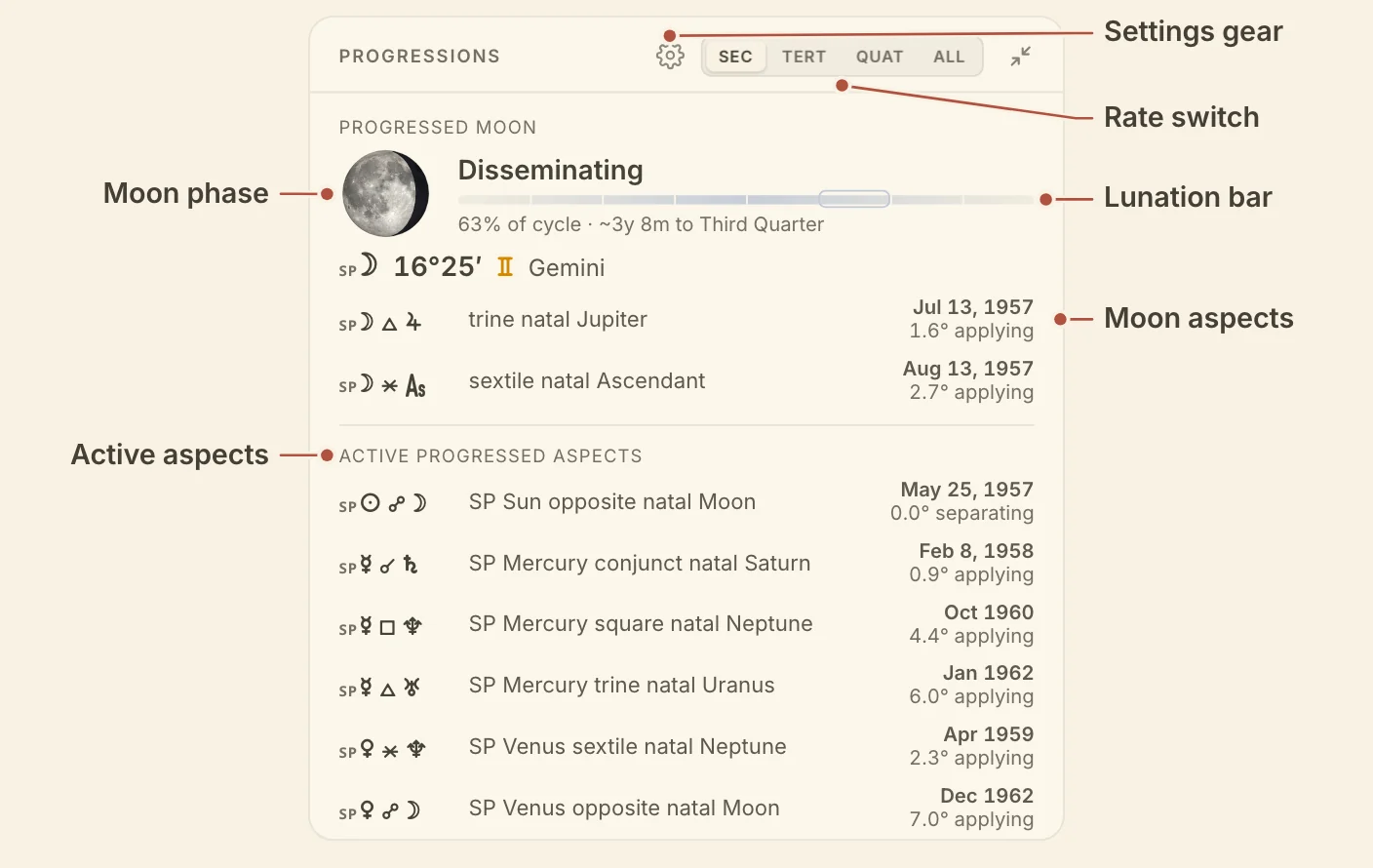
The Progressions card shows the progressed Moon and the progressed aspects in orb at the chart's moment, so you can read the progressed lunation and what is perfecting without casting a progressed chart.
Reading the Progressions card
The Progressions card reads one progression rate at a time, or all three together. The switch in the card's header picks the rate, Secondary (the default), Tertiary, Quaternary or All. Hover a rate for its name and exchange, for example "Secondary progressions · a day for a year". Rows are tagged SP, TP or QP to match.
Progressed Moon shows the Moon's phase as a disc with its name. The bar under it is the progressed lunation in eight parts, with a ring on the part the Moon is in. Hover a part to preview that phase. Under the bar are how far through the cycle the Moon is and roughly how long until the next phase. Then come the progressed Moon's degree and sign, and its aspects with the exact date and the orb.
Active progressed aspects lists the other progressed planets in aspect, written out, for example "SP Mars square natal Sun", each with its exact date and orb.
All stacks the three rates. Progressed Moons gives a row for each rate with its disc, degree, phase and the time to the next phase. Under it, Secondary, Tertiary and Quaternary each list that rate's aspects in date order.
Minimized, the card shows the progressed Moon's phase, degree and phase name. On a computer its aspects sit beside them.
Without a birth time the card leaves out the progressed Moon.
To open a progressed chart as its own wheel, see cast a progressed chart.
Progressions card settings
The Progressions card's own settings choose its orbs and which progressed planets it follows. Click the gear in the card's header to open them.
- Orbs, under Display, picks Classic 1° or one of your saved orb sets.
- Progressed planets lists the progressed planets the card follows. Track a progressed planet adds one, and each opens to the targets and aspects it watches.
The progressed day rate, the lunar month for tertiary and quaternary progressions, and the method for progressed angles are account settings, under progressions in Settings.
Didn't answer it? Write to support@arcusastrology.com.