
In this section (22)
- Profections
- Zodiacal releasing
- Firdaria
- Decennials
- Circumambulation
- Primary directions
- Speculum
- Ascensional times
- Progressions
- Planetary hours
- Lunations
- Aspects
- Declination
- Midpoints
- Dignities and triplicity lords
- Lots
- Fixed stars
- Minor planets
- Chart family
- Elements and Quadruplicity
- Temperament
- Moon
Planetary hours
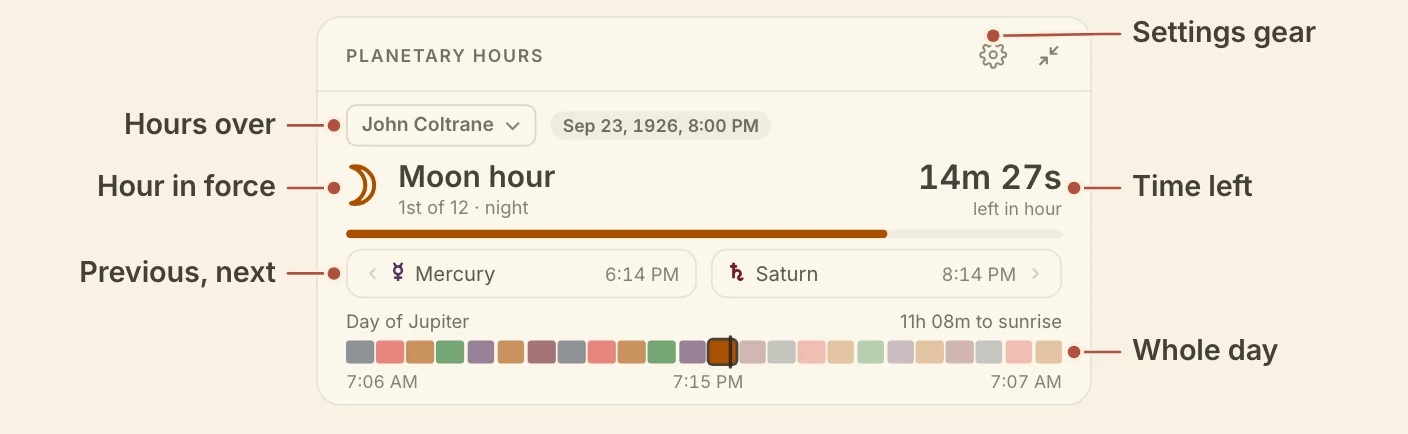
The Planetary Hours card shows the planetary hour at the chart's moment, the hours either side of it, and the whole planetary day, so you can see the hour you are in and move the moment to another.
Reading planetary hours
The Planetary Hours card opens on the hour in force and works outward to the hours beside it and the whole day. The top of the card names the hour, for example "Venus hour", with its place in the day or night ("3rd of 12 · day") and the time left. The bar under it fills as the hour runs.
The previous and next hours sit under the bar with their start times. Click either one to go to it.
Below them are the ruler of the day ("Day of" the planet) and the time to sunrise. A bar holds all twenty-four hours in their rulers' colours, with sunrise, sunset and the next sunrise under it. Hover an hour for its ruler and times, and click it to go to it.
The pill at the top reads Now while the card follows the clock, and the time you are on once you move the moment. Click it to return to now.
Minimized, the card shows the hour, its countdown and the ruler of the day, with the place and moment named.
On a phone, the card's page adds the full schedule, a Day column and a Night column with every hour's ruler and start time. Tap an hour to go to it.
Choosing the place for planetary hours
The Planetary Hours card can read the hours for a chart's birthplace or for your home location. When there is more than one place to cast for, Hours over, at the top of the card, chooses between them.
- A chart on the stage with a birthplace gives the hours at its own birth moment. That reading stays fixed at the birth.
- Your home location gives the hours at the chart's moment. Clicking an hour moves the whole workspace there. With the live sky on the wheel, you can also drag the bar under the hour to scrub within it.
Planetary hours settings
The Planetary Hours card has one setting, Planetary nights, which changes how the night is ruled. Click the gear in the card's header and find it under Hour system. Planetary nights gives the night its own ruler, which is the ruler of the first hour after sunset. It is off by default, so the planetary day runs from sunrise to sunrise.
Didn't answer it? Write to support@arcusastrology.com.